Business Portal Redesign
Improving clarity, workflow efficiency, and business confidence
Role: UX/UI Designer
Status: Approved design, development in progress
Timeline: July – October, 2023
Deliverables: Research synthesis, UI redesign, high-fidelity prototypes, usability validation
Goal: Deliver a streamlined self-service experience that helps businesses understand their performance and take meaningful action to improve trust.

Project Overview
The BBB website supports millions of businesses and consumers. With two existing portals: one for personal use and one for business, it lets small and large businesses manage their accreditation, profile visibility, billing, and customer interactions. The legacy version used outdated interface patterns with unclear hierarchy, resulting in unnecessary customer support volume and low adoption of digital tools. Business owners can also have a consumer account, but they need a separate portal to sign in.
Our modernization initiative focuses on three essential experience pillars:
clarity, actionability, and trust.
Problem Statement
Research identified four primary UX issues:
| Problem | Impact |
|---|---|
| Confusing navigation and terminology | Users struggle to locate core actions such as paying dues or editing profiles |
| Insights lacked meaning and context | “I see numbers, but I do not know whether they are good or bad.” |
| Design did not reflect credibility or modern expectations | Perceived as outdated and less trustworthy |
| Difficult to scale | Hard to introduce enhancements like new tools or data insights |
“I know BBB has tools for my business, but I do not know where to find them.”
Users & Research
Target users included:
- Small business owners
- Multi-location business managers
- Accreditation and customer success representatives
Methods used:
- SME interviews with local BBB offices
- Heuristic evaluation of the current portal
- Analytics review for top tasks and most-clicked features
- User feedback collected through support conversations
Key UX insights:
- Businesses with multiple accounts have to log out to see their other accounts.
- Users prioritize billing and profile updates above all other tasks.
- The portal should increase self-service completion, reducing the number of steps and phone calls required.
- The mobile experience needs significant improvement for on-the-go business owners.
Design Goals
- Provide a simple ‘universal sign-in’ for both consumers and businesses
- Provide a clear visual hierarchy and KPI interpretation.
- Enable multi-business switching within a single account.
- Create a mobile-first, scalable design aligned with the BBB design system.
- Reduce time to complete top tasks by 25 percent.
Strategy & Approach
This redesign focused on:
- Providing a single sign-in process that is straightforward
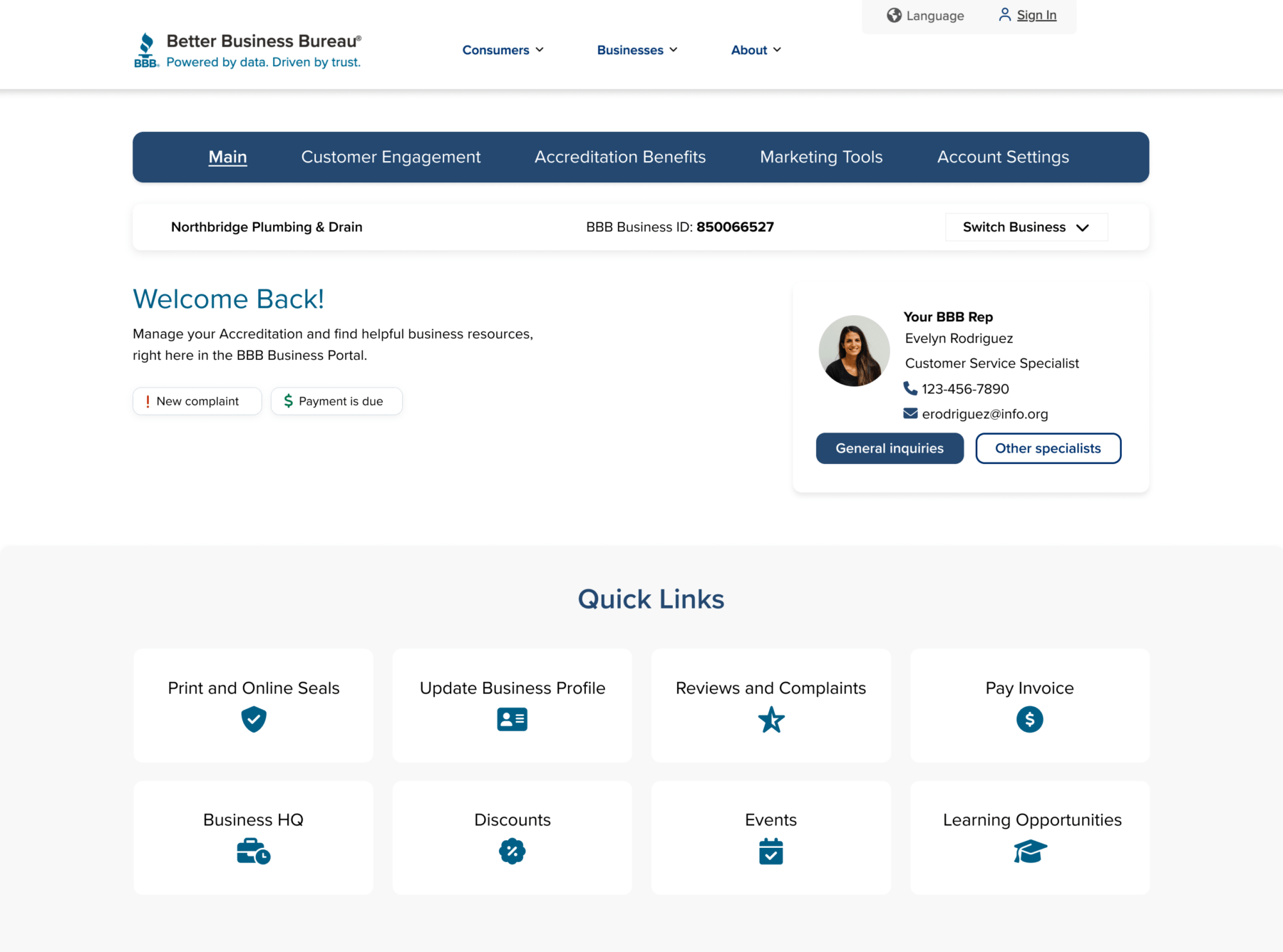
- Introducing quick action cards for the most desirable tasks (based on the research)
- Clearly show the status and urgent tasks on the main page
- Elevating data insights to actionable value
- Removing visual noise and redundant branding
Before & After: Sign in/Create Account
Before
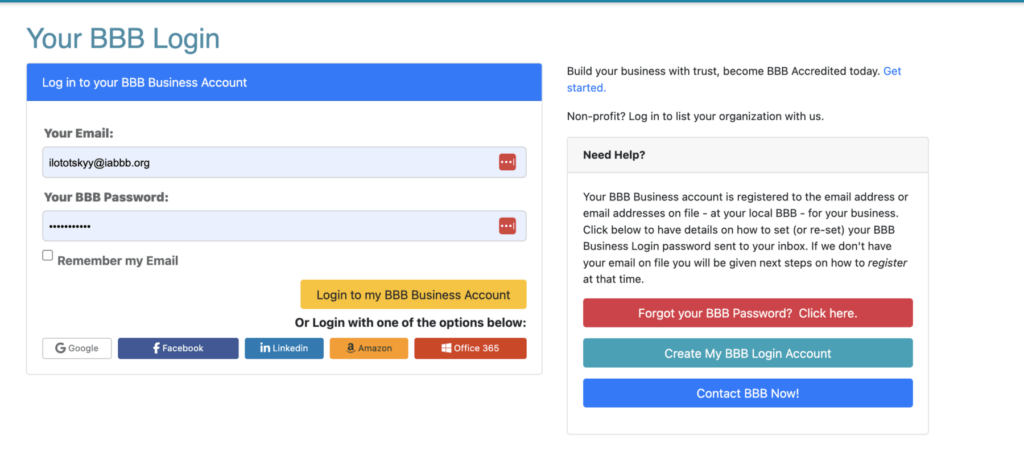
Several conflicting call-to-action buttons; social accounts are not supported unless they are returning users; first-time users need to go through the ‘fogot BBB password’ link to register, which is confusing. Business owners can’t easily switch to their consumer account.
After
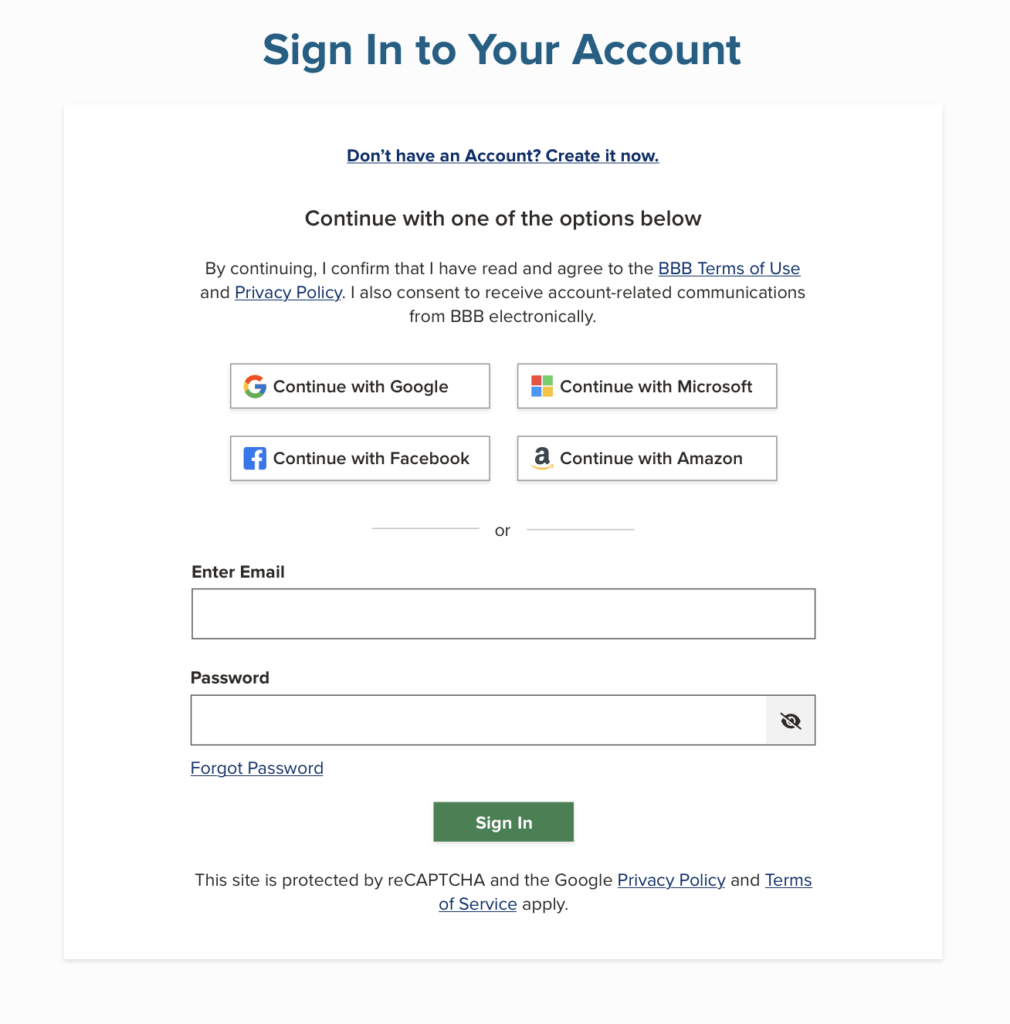
The sign-in page includes not only business owners but also consumer accounts. No matter which account they have, log-in is easy with this one-screen process.
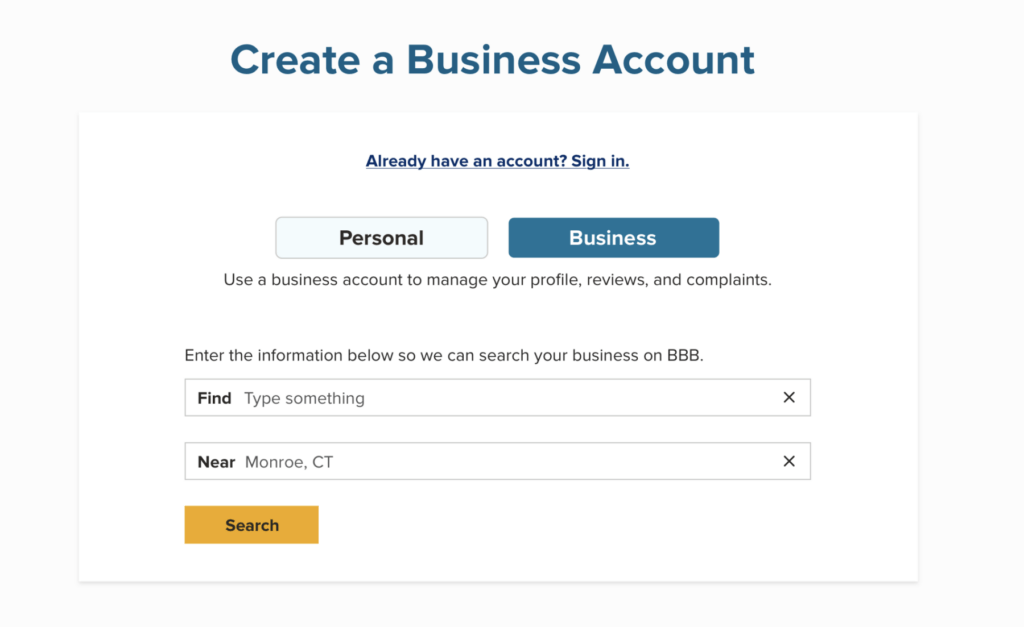
For the business account users, creating an account is easier with this straightforward process.
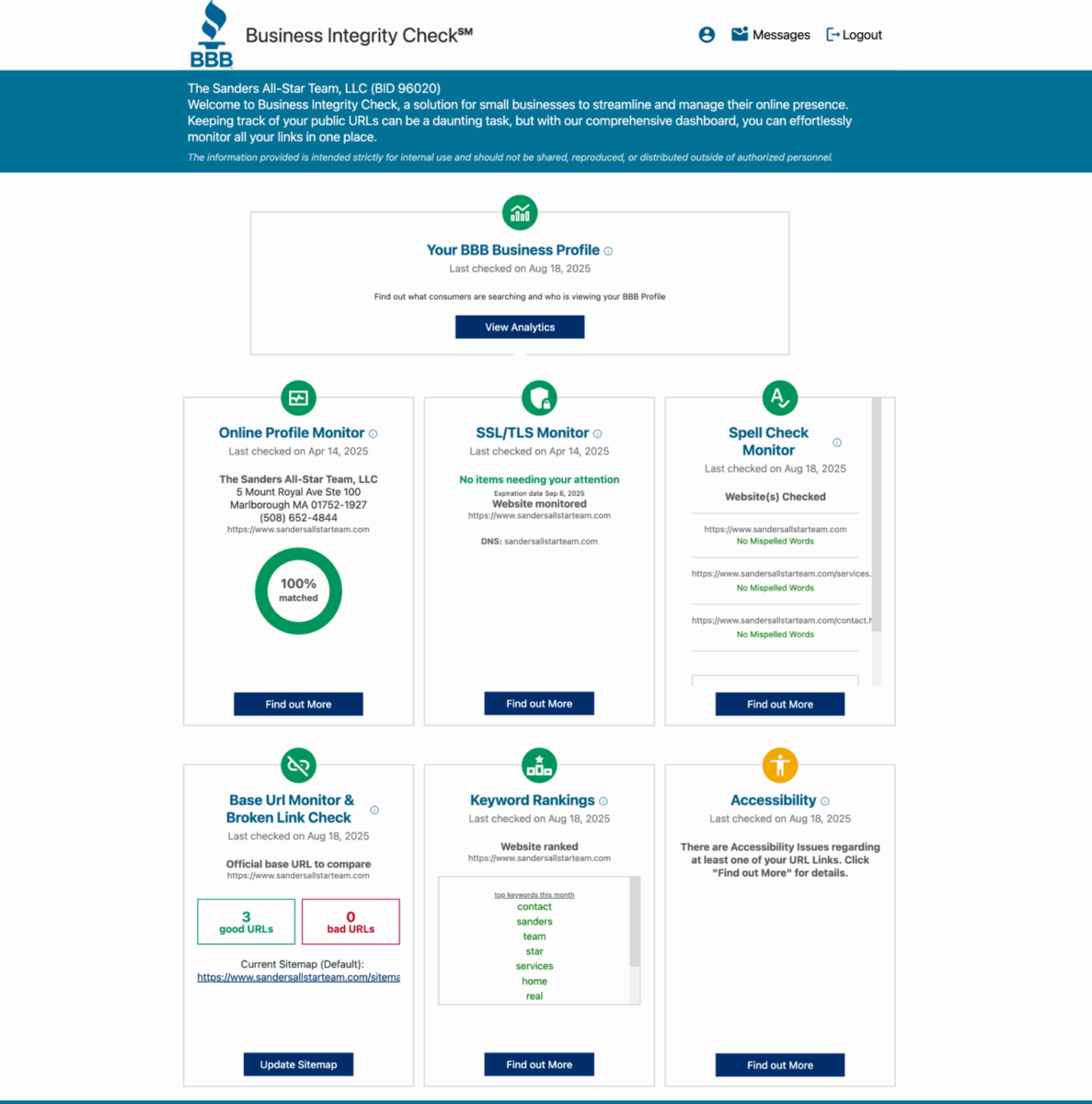
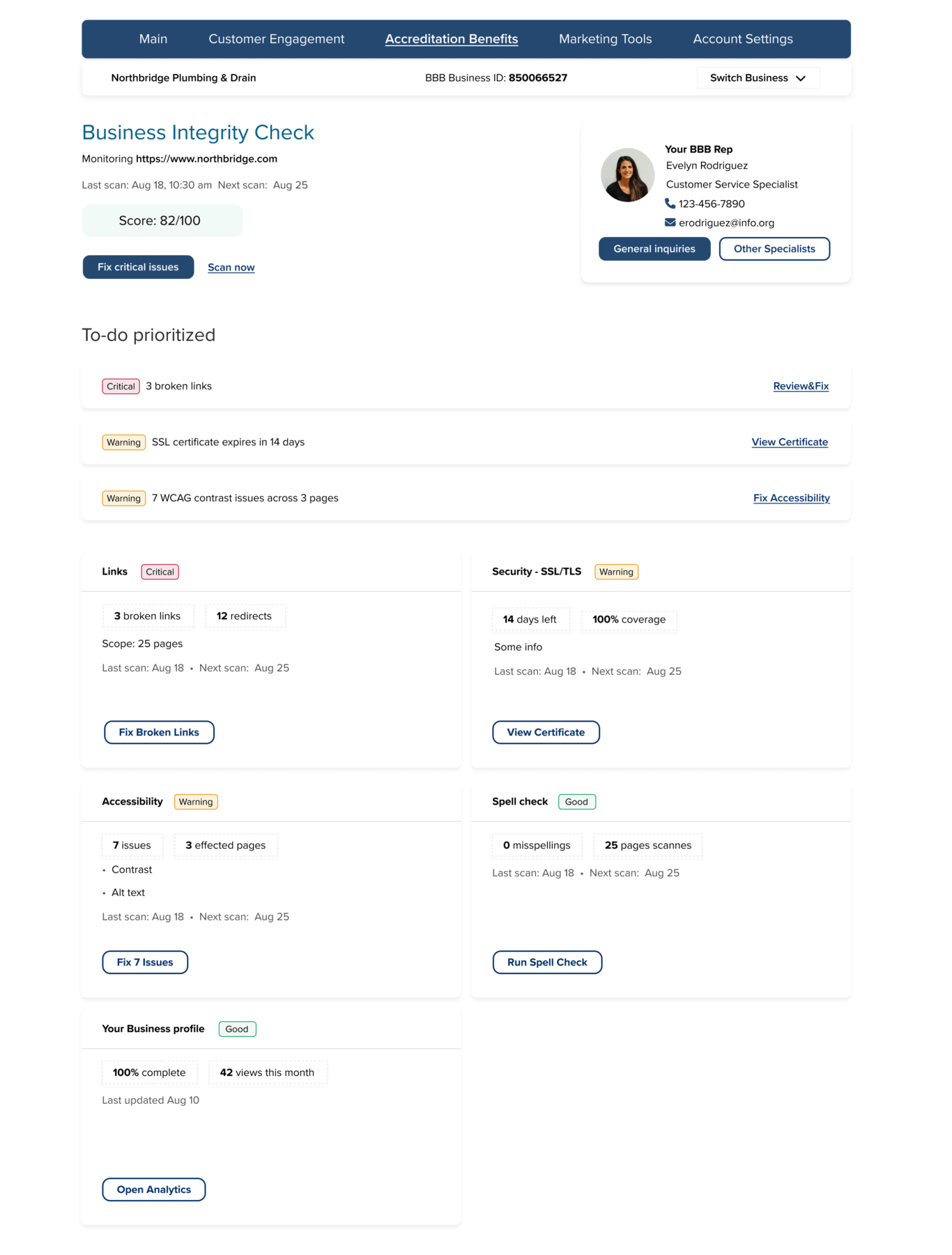
Integrity Check is a great tool for businesses that allows them to check whether their accounts are healthy. Broken links, misspelled words, or accessibility issues can lead to losing a business proposition from a client. But the current state of this page is messy; it’s lacking clarity and a clear next step.
Before & After: Business Integrity Check
| Before | After |
|---|---|
| Dense copy and fragmented warnings | Single prioritized list for critical issues |
| Mixed affordances | Standardized action buttons with clarity |
| Hard to scan | Visually grouped categories with iconography |
| No clear severity hierarchy | Levels marked as Critical / Warning / Good |
Before
After
Core Feature Enhancements
| Feature | User Value |
|---|---|
| Task priority and severity ratings | Clear direction on what needs attention |
| Engagement metrics reformatted as KPI cards | Immediate comprehension of performance |
| “Take Action” workflow surfaced | Faster completion of high-stakes actions |
| Allows to see the account’s standing point | Allows to see the account’s standing point |
| Mobile-first responsive design | Reliable access anywhere |
Validation & Feedback
Informal usability testing and stakeholder review demonstrated great improvement:
| Measure | Legacy Experience | Redesigned |
|---|---|---|
| First-click success locating billing | Low | +63 percent |
| Confidence rating navigating portal | Inconsistent | Significantly improved |
| Task completion friction | High | Reduced cognitive load |
“I know what needs attention right away.”
Status & Next Steps
The redesign has:
- Been approved by Product and Engineering
- Entered phased development rollout
- Delivered with full requirements and design documentation
Planned enhancements:
- Guided onboarding for new accredited businesses
- AI-powered recommendations for trust improvements
- Benchmarking against similar businesses in the area
Reflection
What worked:
- Early alignment with internal business experts accelerated clarity
- Card-based modularity enables rollout in increments
- Collaboration with engineering ensured feasibility from day one
What comes next:
- Extend personalization based on business maturity
- Continue research and A/B usability validation post-launch
“Impactful design means reducing uncertainty and empowering confidence.”